---
title: Sign Up and Login
description: Sign Up & Login Instructions
---
[Skip to content](https://help.symanto.com/en/knowledge-base-symanto-assist/sign-up-and-login#main-content)

Open main navigation
Close main navigation
- [Contact us](mailto:support@symanto.com)
[Contact us](mailto:support@symanto.com)
Welcome! How can we help you?
- There are no suggestions because the search field is empty.
1. [SymantoAssist](https://help.symanto.com/en/knowledge-base-symanto-assist?hsLang=en)
2. [Getting started](https://help.symanto.com/en/knowledge-base-symanto-assist/getting-started?hsLang=en)
# Sign Up and Login
### **Sign Up and Login**
1. Go to [http://app.symantoassist.ai/](http://app.symantoassist.ai/)
2. Enter your **email address**
3. Click **Continue**
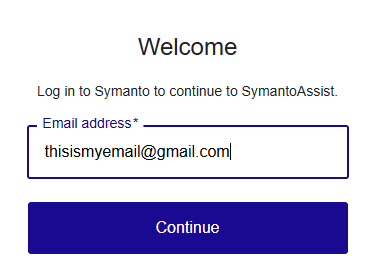
4. Confirm your identity by inserting the verification code from the email you have received
5. Click **Continue**
💡 Tip: If you forget your password, click **Forgot Password?** on the login page to reset it.
### **What if I can’t log in?**
- Double-check your username and password. Make sure you’re typing them exactly as they were given to you (they are case-sensitive, so "Password" is different from "password")
- If you’re using the right details but still can’t log in, try clearing your browser’s cache. Here’s how:
- In Google Chrome: Click the three dots in the top-right corner, go to "More Tools," then "Clear Browsing Data." Choose "Cached images and files" and click "Clear Data"
- In Firefox: Click the three lines in the top-right corner, go to "Settings," then "Privacy & Security," and under "Cookies and Site Data," click "Clear Data"
- If clearing the cache doesn’t work, send an email to your customer success manager, Kim, at [kim.kachelriess@symanto.com](mailto:kim.kachelriess@symanto.com). Explain the problem (e.g., "I can’t log in, and I’ve already cleared my cache"), and Kim will help you
- [Getting started](https://help.symanto.com/en/knowledge-base-symanto-assist/getting-started?hsLang=en)
- [System Overview](https://help.symanto.com/en/knowledge-base-symanto-assist/system-overview?hsLang=en)
- [Setting Up Agents](https://help.symanto.com/en/knowledge-base-symanto-assist/setting-up-agents?hsLang=en)
- [Understanding Conversations](https://help.symanto.com/en/knowledge-base-symanto-assist/understanding-conversations?hsLang=en)
- [Analytics & Insights](https://help.symanto.com/en/knowledge-base-symanto-assist/analytics-insights?hsLang=en)
- [Security, Privacy & Compliance](https://help.symanto.com/en/knowledge-base-symanto-assist/security-privacy-compliance?hsLang=en)
- [Localisation & Language Support](https://help.symanto.com/en/knowledge-base-symanto-assist/localisation-language-support?hsLang=en)
- [Troubleshooting & Support](https://help.symanto.com/en/knowledge-base-symanto-assist/troubleshooting-support?hsLang=en)
- [Release Notes & Updates](https://help.symanto.com/en/knowledge-base-symanto-assist/release-notes-updates?hsLang=en)
[](http://symanto.net)
[mailto:support@symanto.com](mailto:support@symanto.com)
Copyright © 2025, Symanto Research GmbH & Co. KG